How to Diagnose a Sudden Lead Drop in 15 Minutes
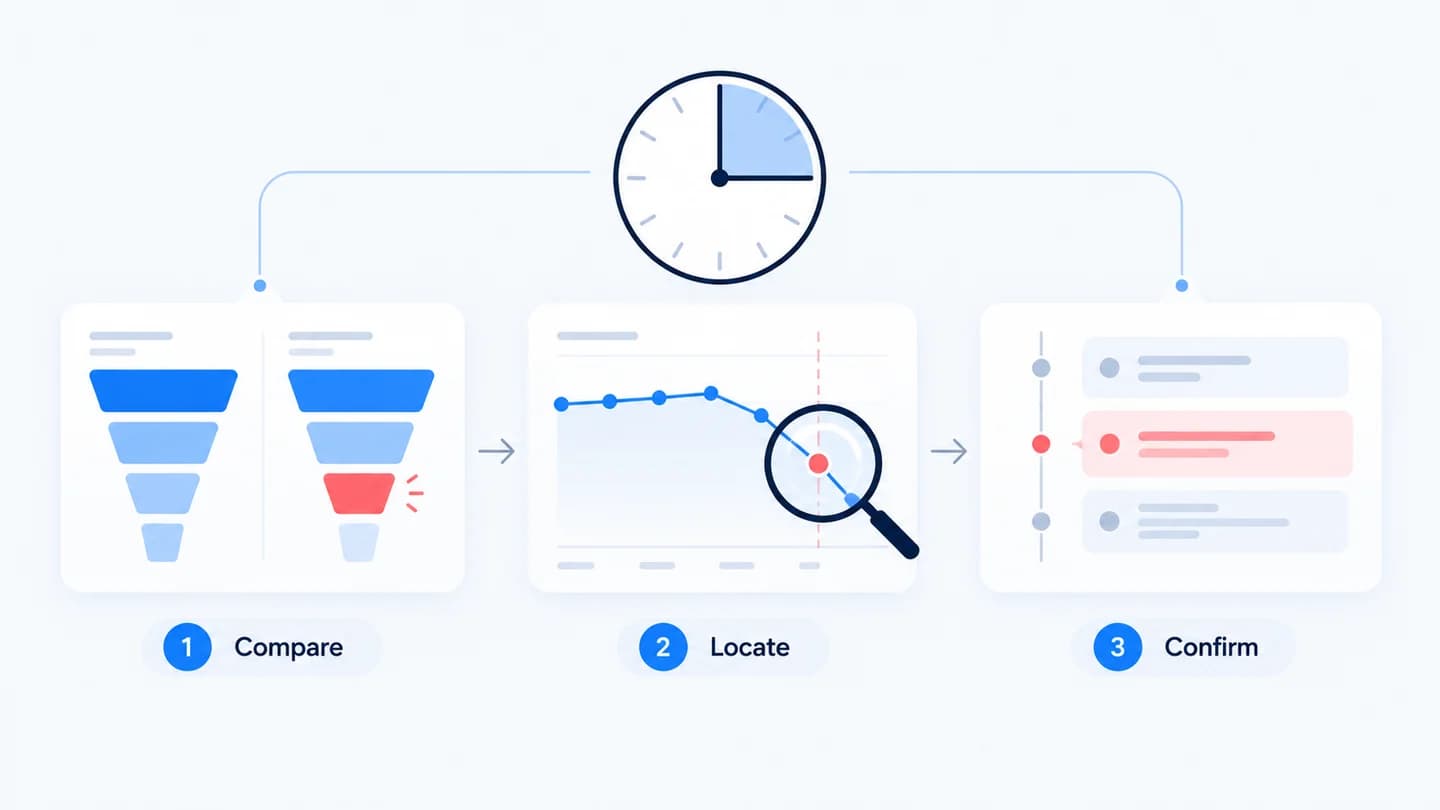
When leads suddenly drop, speed matters. Here is a 15 minute path from "something's off" to a confident area to investigate. The method is simple: count each funnel stage, find the stage that fell, then line it up against what changed. It works for a single client account or for a portfolio of them, and it avoids the most expensive mistake in a lead drop, changing budgets or rebuilding pages before you know where the break is.
Before you start: what to have open
Fifteen minutes is only realistic if you are not hunting for logins. Keep these ready for every account you manage:
- Analytics (usually GA4) with the landing page and lead event you care about.
- The ad accounts, Google Ads and Meta Ads Manager, with access to change history.
- The form tool or CMS, so you can see raw submissions and recent edits.
- The CRM, with a saved view of new leads by source and create date.
- A test identity, such as a tagged email address, to submit test leads without polluting reporting.
Minute 0 to 5: split the funnel
Pull the numbers for two periods, before and after the drop, for each stage: visits, form views, form submits, and leads reaching the CRM. Whichever stage fell hardest is where to look. The free conversion drop diagnostic does this instantly.
A few rules keep the split honest:
- Use the same weekdays on both sides. Three weekdays against the same three weekdays last week beats "this week vs last week".
- Get submits from the form tool, not only from analytics. If the two disagree, tracking is part of the story.
- Compare rates, not just counts. Visits down 10% and submits down 10% is a traffic problem. Visits flat and submits down 40% is not.
- Note when the drop started. The hour or day the number fell is the timestamp you will match against changes in minute 10.
Minute 5 to 10: classify the drop
- Visits fell → traffic or ad delivery.
- Visits held, form views fell → the landing page.
- Form views held, submits fell → the form or tracking.
- Submits held, CRM leads fell → the handoff.
The lead drop checker will label the type for you. If you are unsure whether you are facing fewer visitors or a lower rate, traffic drop vs conversion drop walks through the math.
Two quick sub checks make the classification sharper. Split the flagged stage by device, because mobile only breaks are common and easy to miss on a desktop review. Then split it by source, because a drop confined to one campaign or channel points at that channel's ads or landing variant rather than the site as a whole.
Minute 10 to 15: confirm against changes
Take the flagged stage and pull its change log around the time the drop started. A page edit, budget cut, or broken tag usually lines up with the moment the number fell. That alignment is your likely cause.
Where to find the change log for each stage:
| Flagged stage | Where changes are recorded | What to look for |
|---|---|---|
| Visits | Google Ads Change history, Meta activity history | Budget, bid, status, targeting, final URL edits |
| Form views | CMS revision history, deploy log | Layout changes, moved form, new scripts, redirects |
| Submits | Form builder versions, tag manager publishes | New required fields, validation, trigger edits |
| CRM leads | CRM integration settings, workflow history | Disconnected apps, renamed properties, new filters |
A change that happened within a few hours of the drop, on the stage that dropped, is a strong lead. A change on a different stage, or days earlier, is usually a coincidence.
If nothing lines up
Sometimes the change log for the flagged stage is empty. Before widening the search, check three things that rarely show up in a change log:
- Tracking on the stage itself. Submit a test lead and confirm it registers at every step. A tag that stopped firing makes a healthy stage look broken.
- Changes owned by someone else. A developer deploy, a plugin update, or a CRM admin editing a field mapping will not appear in the marketing team's notes.
- The comparison window. A drop measured against a holiday week or a promo spike may just be a return to normal. Compare against a typical week instead.
If all three come back clean, move one stage upstream and repeat minute 10 to 15 there.
Common misreads that waste the 15 minutes
- Trusting ad platform leads alone. Meta and Google report conversions they attribute, which can lag or be modelled. Count leads where they land, in the form tool and CRM.
- Blaming the last change you remember. The change you made is not always the one that matters. Match timestamps, not memory.
- Reading one day of a low volume account. At 10 leads a day, a day with 6 is noise. Use a three day window.
- Stopping at the first suspect. If the fix does not bring the stage back within a day or two, the real cause is still out there.
Example
Illustrative scenario. Leads went from 120 to 64. Traffic is stable and form views held, but submits are down, so the form or tracking is the suspect. You pull the change log and find a form update deployed on Tuesday afternoon, the same afternoon submits fell. A test submission shows the new consent checkbox blocks the submit button on mobile. Fifteen minutes in, you are fixing a specific form, not guessing.
The underlying numbers, comparing Monday to Wednesday against the same days a week earlier: visits 4,100 vs 4,050, form views 2,900 vs 2,870, submits 132 vs 70, CRM leads 120 vs 64. The submit rate fell from 4.6% to 2.4% while every other step held. Split by device, desktop submits were flat and mobile submits fell by more than two thirds. That is the whole diagnosis in four rows of numbers.
What to send the client at minute 15
You do not need the fix to send a useful update. State the stage that dropped, the evidence, the suspected change, and the next step with a time. For example: "Form submits fell about 47% on mobile from Tuesday afternoon, while traffic and form views held. A form update shipped that afternoon. We are testing it now and expect a fix today." The conversion drop client update template gives you a structure for this.
How long to wait before acting
If the test submission fails, fix it now. If a specific change lines up with the drop, revert it the same day and watch the stage recover. If nothing lines up and volume is low, collect two to three more days before changing budgets or pages, since a premature change makes the next diagnosis harder. For a deeper run through every stage, use the conversion drop investigation checklist.
How Quarkad helps
Quarkad runs this diagnosis continuously. It monitors each funnel step against its baseline, lines up ad, page, form and CRM changes with the moment a step drops, and raises an incident with the evidence and the likely cause.
Related
- Why did my leads drop?
- Why your conversion rate dropped overnight
- Leads submitted but missing in HubSpot
- Conversion drop client update template
FAQ
What if two stages both dropped? Start with the earliest stage in the funnel that moved. Fixing an upstream cause often resolves the downstream symptom.
How long a window should I compare? Use the same days of the week on both sides, for example the last three weekdays against the same three weekdays a week earlier. That keeps weekly rhythm out of the comparison.
What counts as a significant drop? It depends on volume. On a stage that normally sees hundreds of events a day, a sustained fall of 20% or more over a full day is worth investigating. On low volume stages, look for a drop that holds across several days.
The form tool shows submissions but the CRM does not. Where do I start? At the handoff. Check whether the integration is still connected, whether a required CRM property was renamed, and whether a workflow is filtering the leads out.
Can I run this across many client accounts? Yes, if each account has the same four stage counts defined in advance. The split and classification steps are identical; only the change logs differ.