CRM Handoff Failures: The Hidden Cause of Lead Drops
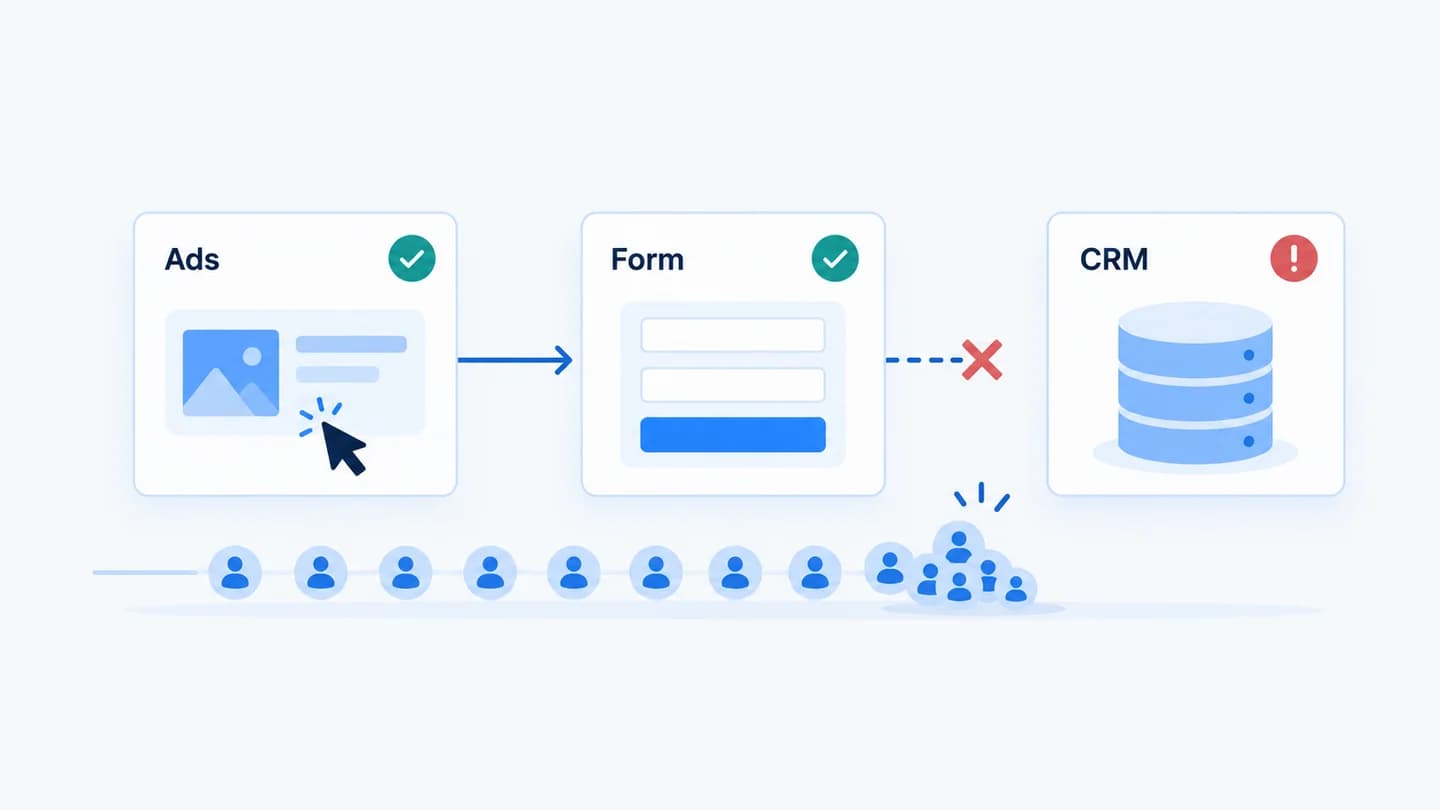
Most conversion drops announce themselves. Traffic falls, or submits fall, and a chart moves. A CRM handoff failure does the opposite: the ads deliver, the page converts, the form reports submissions, and the dashboard stays green. The only signal is sales saying the pipeline is empty, and that signal usually arrives days late.
What a handoff failure is
The CRM handoff is the last step of the funnel: the point where a submitted form becomes a record the sales team can work. It is also the only step that marketing tools generally cannot see, because they stop measuring at the submit event. See what is CRM handoff for the short definition.
A handoff failure means the submit happened and the record did not.
Why it hides
Marketing and sales measure different objects. Marketing counts submits. Sales counts records. Nobody owns the gap between them, so nobody watches it.
The failure is silent by design. Integrations that fail to create a contact usually fail quietly. The visitor still sees a thank you page, because the page has no idea what happened downstream.
It is often partial. One form out of six. One source. One field value that trips validation. Partial failures do not move the totals enough to trigger a threshold, so they survive weekly reporting.
The recovery window is short. A lead who filled a form on Monday and hears nothing has usually moved on by Thursday. The leads are frequently unrecoverable, so the entire cost of the incident is the time it took to notice.
Where handoffs break
- Expired or revoked authentication between the form or automation platform and the CRM.
- Property and field mapping drift, when a field is renamed on one side and not the other.
- Validation rejections, where a required CRM property is missing or a value fails a format rule.
- Paused or edited automations that were never resumed.
- Deduplication behaviour that merges a new submission into an existing record, so the lead exists but no new work item appears.
- Portal or account mismatch, especially after an agency reconnects a client account.
- Hidden field changes, where a UTM or campaign field stops being populated and a routing rule that depends on it stops matching, so records arrive but never reach a queue.
What it costs: a worked example
Illustrative numbers, not a benchmark. A client runs paid search into a demo request form that produces about 60 submissions a week. Sales closes roughly one in ten demos, at an average first year value of $8,000. So each week of leads is worth around $48,000 in expected pipeline.
One of the client's three forms carries about a third of that volume. A field mapping breaks on that form on a Monday, and every submission from it fails to create a contact.
| Days until someone notices | Leads lost | Expected pipeline lost |
|---|---|---|
| 1 | about 3 | about $2,400 |
| 7 | about 20 | about $16,000 |
| 11 | about 31 | about $25,000 |
Two things make this worse than the table suggests. First, the ad spend that bought those clicks is also gone, because the platform counted the conversions and kept optimising toward them. Second, a few of those people will submit again weeks later, already annoyed, and sales will treat them as new leads with no idea they waited. The fix itself is usually small. Almost all of the cost sits in the detection delay.
How to confirm a suspected handoff failure
When sales says leads are missing and marketing says the funnel is fine, test the handoff before debating anything else:
- Pick three recent submissions from the form provider's log, ideally from different forms and sources.
- Search each email in the CRM with saved view filters cleared. Note whether a contact exists, when it was created, and what created it.
- Check the delivering tool's run history for the same timestamps. A rejected request almost always names the reason, such as a property that does not exist or a value that fails validation.
- Split submissions and new records by form for the last two weeks. A break on one form shows up as one line going flat while the others carry on.
- Check the connection itself. Confirm the integration is still installed and authorised in the CRM and in the sending tool.
If all three submissions exist as contacts with the expected owner, the handoff is probably not the problem. Move on to routing, follow-up speed and lead quality instead. The full step by step walk through HubSpot's screens is in leads submitted but missing in HubSpot.
False alarms that look like handoff failures
Not every gap between submits and records is a broken handoff. Rule these out before escalating:
| Looks like | What is actually happening | How to tell |
|---|---|---|
| Fewer new contacts than submits | Returning people were deduplicated into existing records | The emails exist with an older create date and a recent conversion |
| A one day dip in records | Time zone or reporting lag between the form tool and the CRM | The gap closes when you shift the window by a few hours |
| Contacts exist, sales sees none | A view or list filters on lifecycle stage, owner or source | The record appears once filters are cleared |
| No deal or task created | A workflow did not re-enroll a contact it had seen before | The workflow's enrollment history shows the contact skipped |
| Submits up, records flat | Spam or bot submissions that the CRM side filtered or never received | The extra submits share junk values or bursts of timing |
The argument it causes
The characteristic symptom of a handoff failure is not a chart. It is a disagreement. Marketing shows a healthy funnel, sales shows an empty queue, and the meeting becomes about whose numbers are wrong instead of what broke. That pattern is common enough to have its own diagnosis, covered in why your ads look fine but sales says leads are down.
The way out of the argument is a per submission record that says whether each lead reached the CRM, rather than two aggregate numbers that were never meant to reconcile.
Example
Illustrative scenario. A client's lifecycle stage property was tightened to accept a shorter list of values. The website form kept sending the old value. HubSpot rejected the contact creation for every submission from that one form while five other forms kept working. Total lead volume dipped slightly, well inside normal variation, and the break was found eleven days later when a salesperson asked why one campaign never produced anyone to call.
How Quarkad helps
Quarkad treats the handoff as a measured funnel stage rather than an assumption. Every form submit opens a pending handoff that must be matched to a CRM contact inside a verification window. Unmatched submissions are resolved to a terminal state, and a CRM handoff monitor alerts when the failure rate over a rolling window crosses your threshold, with a minimum volume so a quiet hour cannot trigger it. Alerts can go to Slack, so the first person to know is not the sales team. See HubSpot CRM handoff monitoring and Slack alerts.
Related
- Why did my leads drop?
- How to detect form to CRM breaks
- Conversion drop diagnostic
- Conversion drop client update template
- HubSpot integration
FAQ
How often should the handoff be checked? Continuously, not on a report cadence. The value of detection here decays by the hour, because the leads themselves go cold.
Is a small failure rate normal? A low rate of unmatched submissions is expected from bots, duplicate submits, and people who abandon after the request fires. What matters is a change against your own baseline rather than a universal target.
Who should own the handoff? One named person, usually marketing ops or the agency account lead, because the step sits between two teams. Without an owner, each side assumes the other is watching. How agencies should monitor lead handoff quality covers what that owner should track.
What changes usually trigger a handoff failure? Edits that look unrelated to delivery: a renamed form field, a new required CRM property, a tightened dropdown, a reconnected integration, or a workflow paused for testing. Log these changes with a date so a later drop can be lined up against them.
Can a handoff failure affect only some leads? Yes, and that is the usual case. One form, one source, or one field value fails while everything else works, which is why totals rarely reveal it. Split by form and source before deciding the handoff is healthy, and see form monitoring for how the form side of the chain is tracked.